Designing High-Performing Municipal Meeting Spaces: AV Trends, Live-Streaming Challenges & How to Plan for SuccessMunicipal meeting spaces have evolved far beyond simple boardrooms with a projector and podium. Today’s city councils, planning boards, and advisory...
Designing High-Performing Municipal Meeting Spaces: AV Trends, Live-Streaming Challenges & How to Plan for SuccessMunicipal meeting spaces have evolved far beyond simple boardrooms with a projector and podium. Today’s city councils, planning boards, and advisory...
Troubleshooting Common IT Issues: Quick Fixes to Try Before Calling the Pros
Technology should work seamlessly—but when it doesn’t, simple troubleshooting is often all that’s needed to set things right again. Whether you’re dealing with a slow computer, a temperamental system, or connectivity problems, the goal is to get things back to optimal working condition as soon as possible. In this blog post we’ll cover our top 5 quick tips for troubleshooting, and when it makes sense to contact an IT professional.
Troubleshooting Common IT Issues & Five Quick Fixes to Try Before Calling the Pros.
We’ve all experienced the frustration of a system that isn’t working as well as it should. Slow computers, temperamental systems, and connectivity problems can often be remedied with a little basic troubleshooting. Before calling the professionals and unnecessarily racking up a service and support bill, there are a few simple maintenance tasks you can try first. Below is a list of common issues, and our team’s recommended first steps to remedy the situation:
Check Your Connections. It sounds obvious, but often a loose cable or an unplugged power source can be the culprit behind a dark monitor, a computer that won’t turn on, or a device that just won’t connect. A good first troubleshooting step is to ensure all devices, displays, and network connections are securely plugged in and powered on. Likewise, if your connection is lagging or your devices won’t connect at all, check your WIFI or Ethernet connection. Sometimes restarting the router or switching to a wired connection can often improve stability.
Restart Your System. Many IT issues can be resolved by a simple reboot. Try restarting your computer to clear any temporary files, background processes, or cached data that may be slowing down your computer.
Keep Your Software Current. Outdated operating systems and other software can cause compatibility issues and security vulnerabilities. Ensure your systems are up to date for the best possible user experience.
Close Unnecessary Programs and Browser Tabs. Did you know that running too many applications or browser tabs at once can slow down your computer’s performance? If it doesn’t need to be open, close it down.
Clean Up Storage to Optimize Performance. It’s a good idea to review your hard drive for cutter and take a few minutes to clean up files you no longer need. A cluttered hard drive can impact functionality. Regularly review and delete unnecessary files, empty the trash can, and offload large media files to either external or cloud storage.
These are all easy maintenance tasks that you can try on your own. However, if the issue persists, it may be time to call in the experts. Our team specializes in IT and AV troubleshooting and maintenance. We can help keep your technology running smoothly.
Is It Down or Just Me?
In today’s digital world, a sudden inability to access your favorite website—whether for work, shopping, or entertainment—can be disruptive and frustrating. Before assuming the issue is with your connecting web-based program, device or internet connection, it’s a good idea to check if the website itself is experiencing downtime. Thankfully, there are free and reliable online tools that can help you determine whether a website outage is widespread or if the problem is on your end.
Downdetector: Your Go-To Outage Tracker
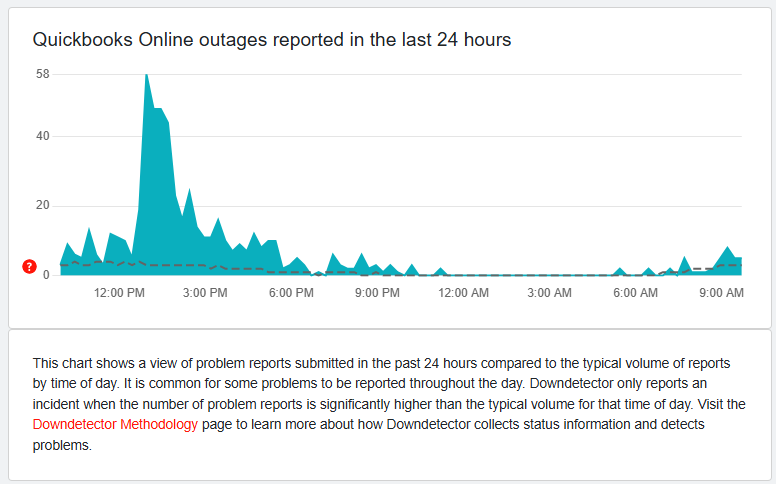
One of the most popular and user-friendly tools for checking website outages is Downdetector.com. This platform provides real-time status reports for a wide range of websites, including social media platforms, streaming services, cloud providers, and online banking services. Users can see a live outage map, read reports from other users, and check historical data to identify patterns of service disruptions. If a website is down, Downdetector will confirm it—saving you time and the frustration of trying to troubleshoot something that’s out of your control.
Screenshot of Downdetector report of Quickbooks Online outages.
Other Free Tools to Check Website Status
While Downdetector is a fantastic resource, these other tools are also great for verifying website status:
IsItDownRightNow.com – This simple yet effective tool pings a website’s server to check if it’s responding. It provides real-time response times and outage history, helping you determine if a site is down for everyone or just for you.
Google’s Chrome Connectivity Checker – Built into the Chrome browser, this tool can help diagnose network issues on your end. Simply enter chrome://network in your address bar to check if there are connectivity problems affecting your access to certain websites.
Could It Be Your Internet Connection?
If Downdetector and similar tools show that a website is working fine for others, the issue may be with your internet connection. Here are a few steps to troubleshoot:
Restart Your Router and Modem A simple reboot can resolve many network-related issues. Unplug your router and modem, wait approximately 30 seconds, then plug them back in. This simple action is often all that’s needed to solve connectivity issues.
Check Other Devices – If other devices on your network can access the website, the problem may be specific to your computer or phone.
Run a Speed Test – Websites like Speedtest.net can help determine if your connection is slow or unstable.
Try a Different Network – If possible, switch to another network (such as mobile data) to see if the issue persists.
Check for ISP Outages – Visit your internet service provider’s website or contact them to see if there are network-wide issues in your area.
When to Contact IT Support
If you’ve tried these simple troubleshooting tips and are still experiencing persistent connectivity issues, it may be time to call a professional. Our team is here to help.
To learn more about our AV and IT solutions or to schedule a free assessment of your current technology or room setup, contact us today.