Designing High-Performing Municipal Meeting Spaces: AV Trends, Live-Streaming Challenges & How to Plan for SuccessMunicipal meeting spaces have evolved far beyond simple boardrooms with a projector and podium. Today’s city councils, planning boards, and advisory...
Designing High-Performing Municipal Meeting Spaces: AV Trends, Live-Streaming Challenges & How to Plan for SuccessMunicipal meeting spaces have evolved far beyond simple boardrooms with a projector and podium. Today’s city councils, planning boards, and advisory...
What Causes Electrical Interference in Microphones? A Guide for Conference Rooms and Commercial AV Systems
When you’re hosting an important meeting, the last thing you want is a distracting hum, buzz, or static interrupting the conversation. Unfortunately, electrical interference with microphones is one of the most common audio issues affecting conference rooms, boardrooms, classrooms, and collaboration spaces.
Whether you’re using Microsoft Teams, Zoom, or another video conferencing platform, poor audio quality due to electrical interference can frustrate participants, reduce productivity, and leave a less-than-professional impression.
At Smart Homes & Smart Offices, we help organizations throughout Michigan design and maintain commercial AV systems that deliver clear audio. Understanding what causes microphone interference is the first step toward preventing it.
What is Electrical Interference in Microphones and What Causes It?
As we continue to rely on complex, integrated technologies in public and private spaces, the opportunity for those components to interfere with one another increases. When it comes to sound quality, this often plays out as either an issue with audio feedback or electrical interference.
Unlike audio feedback – a high-pitched squeal caused by sound looping between a microphone and speaker – electrical interference originates from nearby electronics, power sources, wiring, or radio frequency signals.
Electrical interference occurs when unwanted electrical signals enter a microphone or audio system and become audible through speakers, conferencing equipment, or recording devices.
The result can be distracting noises that interfere with speech clarity and meeting productivity.
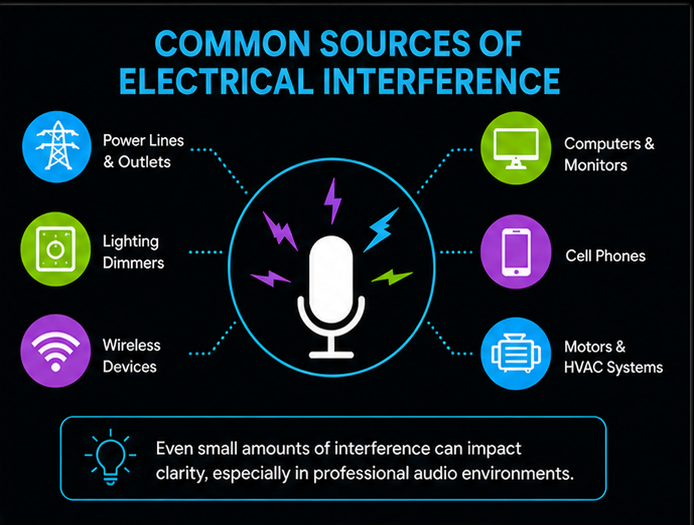
What Causes Electrical Interference with Microphones? Several factors can introduce unwanted noise into an audio system.
1. Electromagnetic Interference (EMI). Electromagnetic interference occurs when electrical devices emit electromagnetic energy that is picked up by microphone cables or audio equipment. Common sources include:
Computers and monitors
Wi-Fi routers and wireless access points
LED lighting systems
Power transformers
HVAC equipment
Elevators
Smartphones and tablets
Because microphone cables can act like antennas, nearby electrical equipment may introduce buzzing, humming, clicking, or static into the audio signal.
2. Radio Frequency Interference (RFI). Wireless microphone systems are especially susceptible to radio frequency interference. Potential sources include:
Two-way radios
Cellular networks
Broadcast radio stations
Wireless communication systems
Although today’s wireless microphones include sophisticated filtering technology, interference can still occur if frequencies are not properly coordinated. In rare situations, users may even hear fragments of radio transmissions through an audio system.
3. Ground Loops. Ground loops are one of the most common causes of persistent audio hum in commercial conference rooms.
A ground loop occurs when multiple pieces of AV equipment are connected to different electrical grounds with slight voltage differences. This creates unwanted current flow through the audio system. Typical symptoms include:
A continuous low-frequency hum
Buzzing that worsens as additional equipment is connected
Ground loops frequently occur in meeting spaces where computers, displays, amplifiers, digital signal processors (DSPs), USB peripherals, and conferencing hardware share interconnected power and audio connections.
4. Poor Cable Shielding. Not all microphone cables provide the same level of protection from electrical noise. Interference often results from:
Professional-grade shielded cabling significantly reduces the amount of electrical noise that reaches microphones.
5. Power Supply Noise. Many modern electronic devices generate electrical noise that can travel through power circuits and into audio systems. Common offenders include:
Laptop power adapters
USB charging devices
Low-quality power supplies
Lighting dimmer controls
Without proper filtering and power management, these devices can introduce high-pitched whining, buzzing, or intermittent clicking sounds.
What Does Electrical Interference Sound Like?
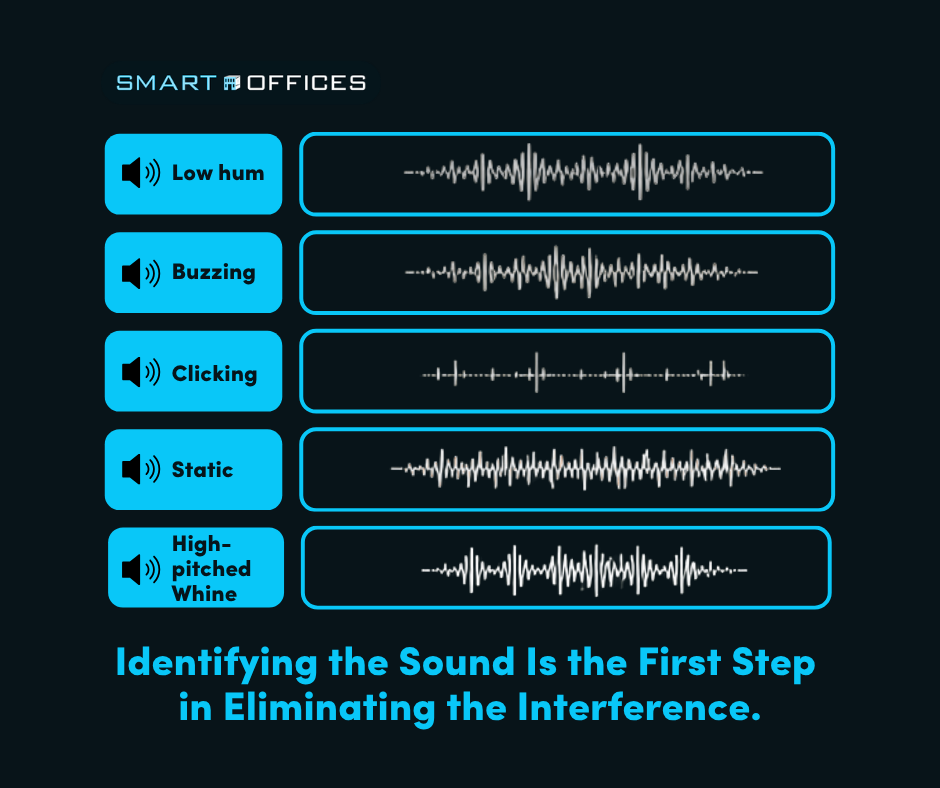
Different types of interference often produce recognizable sounds that can help identify the underlying issue.
Sound
Most Likely Cause
Low humming
Ground loop or power issue
Buzzing
Electromagnetic interference (EMI)
Clicking or ticking
Mobile phones or wireless devices
Static
Damaged cable or poor connection
High-pitched whine
Switching power supplies or LED lighting drivers
Understanding these audio characteristics can help technicians diagnose problems more efficiently.
Low hum
Buzzing
Clicking
Static
High-Pitched Whine
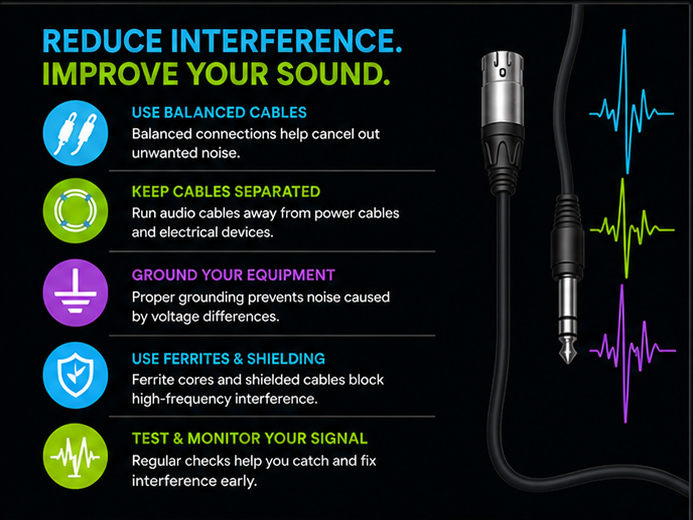
How Can You Reduce Electrical Interference?
Many interference issues can be prevented through proper AV system design and installation. It’s best practice to:
Use balanced microphone connections such as XLR terminal blocks or Euroblocks.
Keep audio cables separate from electrical power wiring.
Properly ground all connected AV equipment.
Use commercial-grade digital signal processors and audio mixers.
Maintain adequate distance between microphones and sources of electromagnetic interference.
Coordinate wireless microphone frequencies to avoid signal conflicts.
Install power conditioning equipment where appropriate.
Professional system design often eliminates interference before it becomes noticeable.
Why Audio Quality Matters in Conference Rooms
Today’s meeting spaces rely heavily on hybrid collaboration. Whether participants are seated around the conference table or joining remotely through Microsoft Teams or Zoom, clear audio is essential.
Electrical interference can:
Reduce speech intelligibility
Distract meeting participants
Cause listener fatigue
Make virtual meetings sound unprofessional
Decrease productivity during presentations and discussions
Even minor background noise becomes much more noticeable during video conferencing because microphones amplify sounds that people in the room may barely hear.
Frequently Asked Questions
What causes a microphone to hum? A persistent hum is most commonly caused by a ground loop, poor grounding, or electrical interference from nearby power equipment.
Why does my conference room microphone buzz? Buzzing often results from electromagnetic interference (EMI) generated by computers, lighting systems, HVAC equipment, or improperly shielded cables.
Can Wi-Fi interfere with microphones? In some situations, wireless devices—including Wi-Fi equipment, smartphones, and other radio transmitters—can contribute to interference, particularly if audio equipment is poorly shielded or wireless microphone frequencies are not properly coordinated.
Can electrical interference be fixed? Yes. Most interference issues can be resolved through proper grounding, improved cable management, professional AV system design, balanced audio connections, and high-quality equipment.
Why Professional AV Design Makes a Difference
Preventing electrical interference begins long before microphones are installed. A professionally engineered conference room considers:
Equipment compatibility
Cable routing and management
Electrical grounding
Power distribution
Wireless frequency coordination
Digital signal processing (DSP) configuration
Room acoustics
These elements work together to create reliable, intelligible audio for every meeting.
Need Help Improving Conference Room Audio?
At Smart Homes and Smart Offices, we design integrated AV solutions that help businesses, municipalities, educational institutions, and organizations throughout Mid-Michigan, Southeast Michigan, the Greater Grand Rapids Area and their surrounding communities achieve dependable, professional-quality audio in every conference room.
If your organization is experiencing buzzing microphones, background hum, or inconsistent conference room audio, Smart Offices can help. Our team designs, installs, and supports commercial AV systems that provide exceptional audio performance for boardrooms, meeting spaces, classrooms, and collaborative environments.
Whether you’re upgrading an existing conference room or planning a new installation, we’ll help ensure every participant—both in the room and remote—hears the conversation clearly.
Contact us today to schedule a consultation and learn how we can improve communication and collaboration throughout your organization.