Designing High-Performing Municipal Meeting Spaces: AV Trends, Live-Streaming Challenges & How to Plan for SuccessMunicipal meeting spaces have evolved far beyond simple boardrooms with a projector and podium. Today’s city councils, planning boards, and advisory...
Designing High-Performing Municipal Meeting Spaces: AV Trends, Live-Streaming Challenges & How to Plan for SuccessMunicipal meeting spaces have evolved far beyond simple boardrooms with a projector and podium. Today’s city councils, planning boards, and advisory...
Digital Signage Solutions: What Businesses Need to Know Before Investing
Digital signage has evolved from simple screen displays into powerful communication tools that drive engagement, improve customer experience, and streamline internal messaging. From retail stores and corporate offices to healthcare facilities and hospitality environments, the right digital signage solution can transform how information is shared.
But not all systems are created equal.
In this blog post, we’ll break down the key considerations when choosing a digital signage solution—from infrastructure and cost to hardware decisions and emerging technologies.
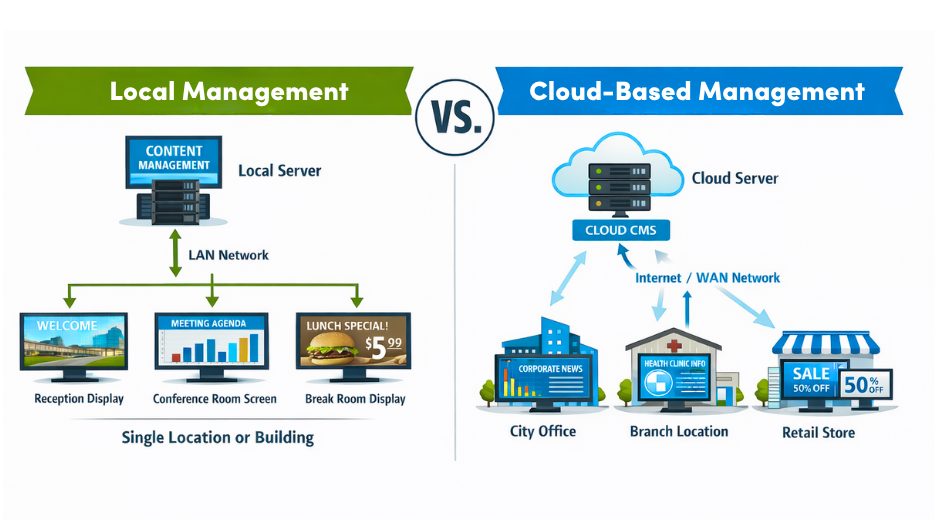
When evaluating a digital signage solution, one of the most important decisions you’ll make is how your content will be managed and distributed. At a high level, most systems fall into two categories: locally managed setups, where content is controlled on-site, and cloud-based platforms, which allow for remote access and centralized control.
Each approach offers distinct advantages depending on your organization’s size, technical resources, and long-term goals. Understanding the differences between these two models is key to selecting a solution that aligns with your operational needs today—and scales effectively for the future.
Local Management (TV + Player On-Site)
In a locally managed setup, each screen is connected to a media player that is updated manually or through a local network.
Content is stored, scheduled, and distributed from within your physical location manually or through a locally hosted content management system. This is typically done through a dedicated media player, USB drive, or an on-premise server connected through your internal network (LAN).
In a locally-managed setup, your signage operates independently of external cloud services and internet connectivity.
For many smaller environments, this approach offers simplicity and control. A restaurant, for example, might update menu boards using a USB drive or a single media player, while a corporate office may use an internal server to push announcements to screens throughout the building.
However, as the number of displays grows—or if your business operates across multiple locations—local management can quickly become more labor-intensive. Updates often require on-site access or IT involvement, and maintaining consistency across screens can be challenging without centralized oversight.
Pros of Local Management:
No recurring monthly fees
Full control over content and data
Works without internet dependency
Cons of Local Management:
Limited scalability
Requires on-site management or IT involvement
Updates can be time-consuming across multiple screens
This type of setup is best for single-location businesses like restaurants, small offices, or waiting rooms.
Cloud-Based Digital Signage Platforms
Cloud-based systems allow users to manage and deploy content remotely via a centralized dashboard.
Cloud-based digital signage platforms take a more scalable approach by allowing users to manage content remotely through a web-based dashboard. Instead of relying on on-site servers or manual updates, content is uploaded to the cloud and distributed to connected displays over the internet.
This centralized model enables businesses to control one screen—or hundreds of screens—across multiple locations from a single interface. Updates can be made in real time, scheduled in advance, and deployed instantly to specific screens, regions, or the entire system.
For example, a healthcare organization can ensure consistent messaging across clinics, waiting rooms, and administrative offices.
Pros of Cloud-Based Digital Signage
Update all screens at once from anywhere
Ideal for multi-location businesses
Scheduling, automation, and analytics capabilities
Cons of Cloud-Based Digital Signage
Recurring subscription costs
Requires reliable internet connectivity
Ongoing platform dependency
LAN vs. WAN: Scaling Across Locations
As businesses grow, digital signage often needs to scale with them.
Local Area Network (LAN) systems distribute content within a single building or campus. An example of a LAN-based system would be a corporate office that pushes internal announcements to screens in conference rooms, lobbies, and break areas.
Wide Area Network (WAN) systems allow centralized control across multiple geographic locations. A healthcare network that updates patient information screens across multiple clinics simultaneously to ensure consistent messaging and compliance is an example of where a WAN-based system would be used.
All-in-One Displays vs. Separate Screens +Players
Choosing between all-in-one displays and separate screens with external media players directly impacts the flexibility, scalability, and long-term cost of your digital signage system.
All-in-one solutions offer a streamlined, plug-and-play approach with fewer components and simpler installation, making them appealing for smaller or more standardized deployments.
In contrast, pairing commercial displays with dedicated signage players provides greater customization, performance, and upgrade flexibility—allowing businesses to adapt their system as technology evolves or operational needs change.
Understanding the trade-offs between these two setups ensures you select a solution that not only meets your immediate needs, but also supports future growth without requiring a complete system overhaul.
All-in-One Digital Signage Displays
These units integrate the media player directly into the screen.
Pros:
Clean installation with fewer components
Simplified deployment
Often optimized for specific software platforms
Cons:
Higher upfront cost
Limited flexibility for upgrades
Vendor lock-in risk
Separate Commercial Displays + External Players
This approach uses a dedicated signage player connected to a commercial-grade display.
Pros:
Greater flexibility and scalability
Easier to upgrade components independently
Wider range of software compatibility
Cons:
More components to install and manage
Slightly more complex setup
Many growing businesses start with all-in-one displays but transition to separate players as their needs evolve—especially when expanding to multiple locations.
Disruptors in the Market
Solutions like the Amazon Signage Stick are beginning to reshape the digital signage landscape.
These low-cost, plug-and-play devices make it easier for smaller businesses to enter the digital signage field, are easy to use, and integrate with cloud-based CMS platforms.
However, there are trade-offs, including limited processing power, fewer enterprise-level security and management features, and they are less reliable in environments that require 24/7 play-time.
While these devices are attractive for small-scale deployments, they often fall short in commercial environments where uptime, security, and scalability are critical.
What to Look for in a Digital Signage Player
Choosing the right player is essential for performance and long-term success. When evaluating features, ask the following:
Reliability: Is it built for continuous operation (24/7 uptime)?
Performance: Does it provide smooth playback of high-resolution video and dynamic content?
Remote Management: Does it have the ability to monitor and update devices remotely?
Security: What are its network security and data protection capabilities?
Compatibility: Does it work with leading CMS platforms?
Connectivity: Doe sit support LAN, WAN, Wi-Fi, and cloud integration?
A reliable signage player should feel more like enterprise IT hardware than a consumer streaming device.
Residential vs. Commercial Displays: A Critical Distinction
When selecting displays for a digital signage system, it can be tempting to choose standard residential TVs based on their lower upfront cost and easy availability. However, this decision often leads to performance issues, reduced lifespan, and higher long-term expenses. Commercial-grade displays are specifically engineered for business environments, where reliability, brightness, and extended operating hours are essential.
Understanding the fundamental differences between residential and commercial displays is critical—not only for protecting your investment, but for ensuring your digital signage performs consistently and professionally in real-world conditions.
Residential TVs
Designed for home use, these displays are not built for extended operation.
Limitations:
Not rated for continuous use
Lower brightness (poor visibility in well-lit spaces)
Shorter lifespan under commercial conditions
Voided warranties in business environments
Commercial-Grade Displays
Built specifically for business applications.
Advantages:
Designed for 16/7 or 24/7 operation
Higher brightness and anti-glare coatings
Longer lifespan and better heat management
Commercial warranties
We’ve seen companies install residential TVs to save money. But it’s not uncommon to see them begin to fail in less than a year due to constant use. Replacing them ends up costing more than investing in commercial displays from the start.
Using residential TVs in commercial environments is a short-term cost savings that often leads to long-term headaches.
Choosing the Right Digital Signage Solutions
Digital signage is not just about screens—it’s about control, consistency, and scalability.
The right solution should:
Align with your business size and growth plans
Support your IT infrastructure
Deliver reliable, high-quality performance
Be easy to manage and scale
At Smart Offices, we specialize in designing and deploying digital signage solutions tailored to your business—whether you’re starting small or scaling across multiple locations.
From hardware selection and network design to content management and ongoing support, we ensure your system is built for performance, reliability, and growth.
Contact us today to learn more about digital signage solutions that work for your business – not against it.